Guides · Discount codes
What Shopify's "Sales by discount codes" report doesn't tell you
If you run discount codes on Shopify, the Sales by discount codes report is probably where you check them. It answers "how much did this code cost, and how many orders used it?" It doesn't answer the question most merchants are really asking: was it worth it?
What the report shows
You'll find it in Analytics → Reports → Sales by discount codes. It groups your sales by discount, with columns for the discount name, code, type and method, the discount amount, the number of orders and the total sales.
Shopify's own help page adds two notes worth knowing:
- If you allow discounts to combine, the same order can be counted more than once, once for each discount on it.
- The sales figure only includes the line items the discount applied to, not the whole order.
That's useful for spotting your most-used codes and what they cost. But every row treats all orders the same, whoever placed them. That leaves four questions unanswered.
1. Were these customers already buying from you at full price?
A loyal customer who paid full price last month and a brand-new shopper who found you through an ad look identical in the report: one order, one discount.
Shopify's analytics can split a code's orders into new and returning customers. Open Analytics, start a new exploration in the ShopifyQL editor, and run this, changing the code to your own:
FROM sales
SHOW orders, total_sales, customers
WHERE discount_code = 'LOYAL20'
GROUP BY new_or_returning_customer
SINCE -365d UNTIL today
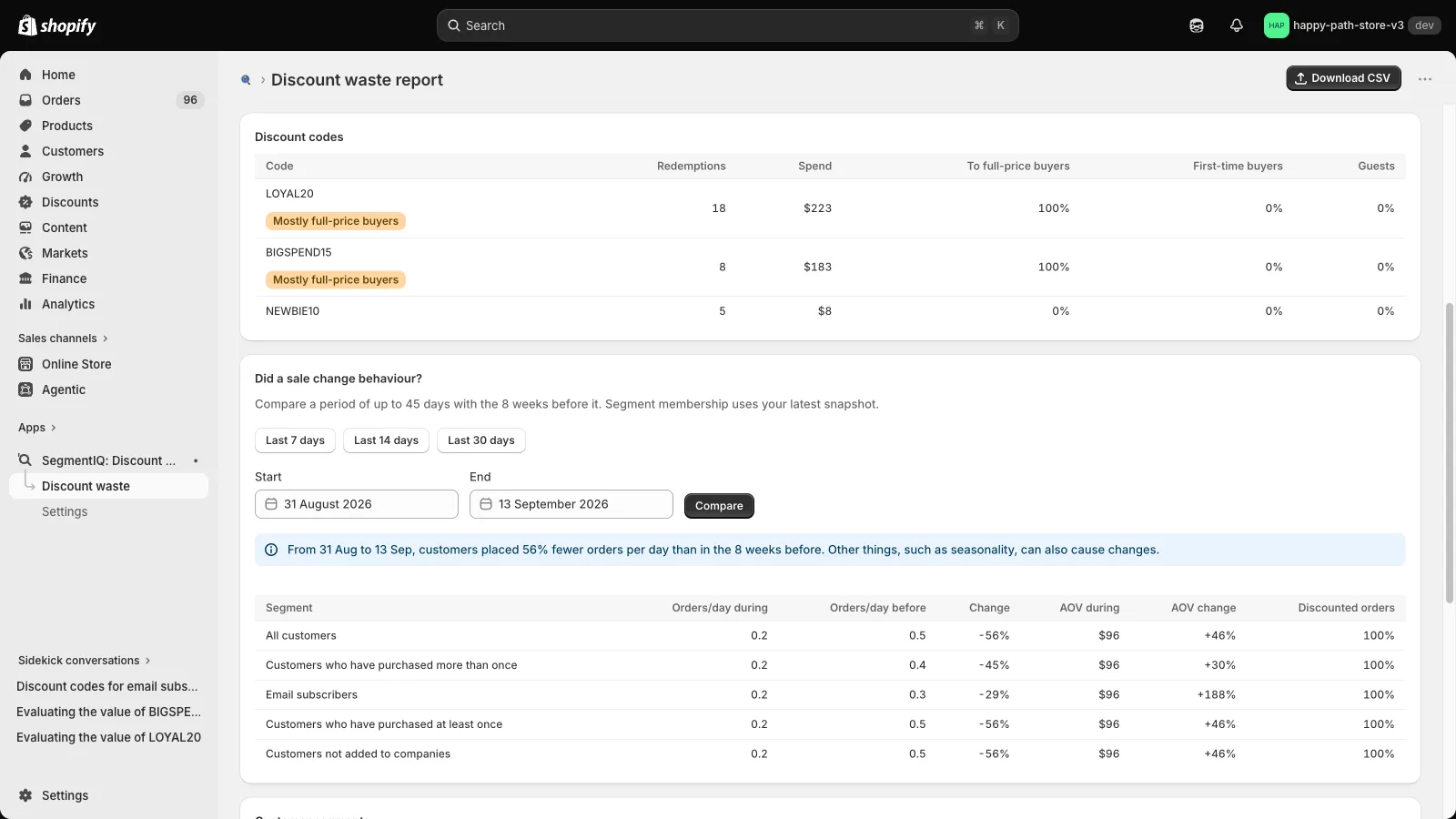
That's a good start, but "returning" means the customer has any earlier order. A customer who only ever buys with a code counts the same as one who paid full price last week. The more useful question is narrower: had this customer paid full price recently? If most of a code's discount goes to people who were already buying at full price, many of them may well have bought without it.
2. Which customer segments rely on it?
Discounts rarely affect every customer the same way. Your email subscribers might use a code on most of their orders, while customers who haven't bought in six months never see it. The report has no customer segment breakdown, so you can't see which segments have learned to wait for a code before they order, or which segments a discount could actually win back.
3. Has the code leaked?
Codes meant for influencers, affiliates or one email campaign often end up on coupon sites and browser extensions. In the report, a leaked code just looks popular. The warning signs are in who is redeeming it: a sudden burst of first-time buyers with one-off email addresses, often with no connection to the audience the code was meant for.
4. Did the sale add revenue, or just move it?
Discounted sales aren't the same as extra sales. If customers stock up during a sale and then buy less for weeks afterwards, or hold off in the run-up to it, the total can look impressive while overall revenue barely changes. To judge a promotion, compare its orders and revenue with a normal period before it. The only way to prove what a discount caused is a test, such as a smaller offer for part of a segment.
How to check your own codes
- Run the ShopifyQL query above for a quick new vs returning split on your biggest code.
- Use the free Discount Code Checker. Export your orders from Shopify as a CSV and drop it in. For every code it shows how much of the discount went to customers who had paid full price in the previous 90, 180 or 365 days, and how many orders came from first-time buyers. The file never leaves your browser.
- Install SegmentIQ to see the same thing by customer segment, kept up to date, with a before/after comparison for your sales and answers in Shopify Sidekick. The free plan covers your biggest code.
What to do with the answer
- Mostly recent full-price buyers: test a smaller offer for part of that group, or restrict the code, for example to customers who haven't ordered in 90 days. Watch whether their orders drop.
- Mostly first-time buyers: the code is probably doing its job. The next question is whether those customers come back at full price.
- A burst of first-time buyers on a code meant for one audience: check coupon sites for the code, retire it, and consider single-use codes for affiliates and influencers. See how to tell if a code leaked.
Next: How to track Shopify discount codes by new vs returning customers
All of these figures are estimates from order history. They show who received a discount, not what the discount caused. Treat a high share as a sign worth testing, not proof that the discount was wasted.
Check your discount codes before Black Friday
See which codes went to customers who had recently paid full price, by code and customer segment. Read-only, and ready a few minutes after install.
Install SegmentIQ free