Guides · Discount codes
How to tell if your Shopify discount code leaked, using your own orders
A code you gave to one influencer or one email list can end up on coupon sites and browser extensions within days. Then shoppers who were already at checkout get a discount they were never meant to have. Before you pay for a leak-blocking app, your own order data can tell you whether it's actually happening.
The signs a code has leaked
- Redemptions jump without a reason. The code suddenly gets used far more than usual, on days when you didn't send an email or post about it.
- A wave of one-off email addresses. Shoppers who find a code on a coupon site usually aren't on your list and have never ordered before, so the code's redemptions shift heavily towards first-time buyers.
- First-time buyers on a code meant for existing customers. A "thank you" code for your email list shouldn't be redeemed mainly by people who've never bought before.
- It keeps being used after the campaign ended. Weeks after the send or the influencer post, the code is still going.
- It shows up online. Search for your store name plus "discount code" or "coupon" and see what comes back.
One sign on its own isn't proof. A popular influencer post also brings a spike of new customers. Several signs together on the same code are worth acting on.
Check 1: redemptions over time
In your Shopify admin, open Analytics, start a new exploration and open the ShopifyQL editor. This shows orders using a code, day by day, and how many were first purchases:
FROM sales
SHOW orders, orders_first_time
WHERE discount_code = 'INFLUENCER30'
TIMESERIES day
SINCE -90d UNTIL today
Look for days with a jump in orders that you can't tie to something you did. Compare them with your campaign dates.
Check 2: who redeemed it
Your orders export shows each redemption's email address, so you can see whether a code went to people who already buy from you or to a stream of new addresses.
- In Orders, click Export and download the CSV for the period the code was live, plus several months before, so returning customers are recognised.
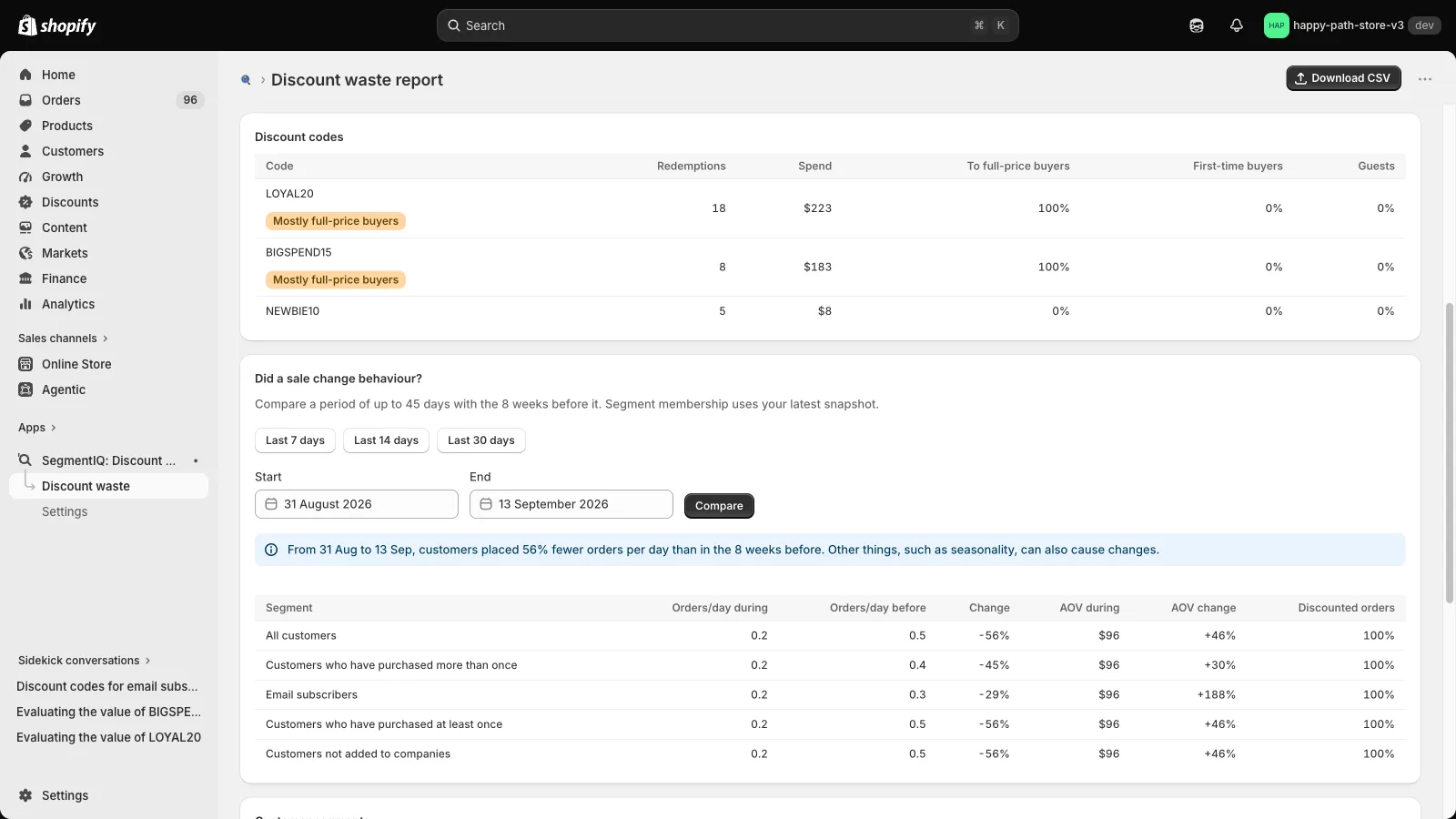
- Drop the file into the free Discount Code Checker. For every code it shows the share of redemptions from first-time buyers and the share of the discount that went to customers who had recently paid full price. The file stays in your browser.
- Compare codes. A code meant for a small, known audience with a much higher first-time share than your welcome code stands out, especially if those orders arrived in a burst.
For example, in the checker's sample file for a fictional tea shop, nearly every INFLUENCER30 order comes from a first-time buyer, most of them arriving weeks after the influencer's post, while the loyalty code goes almost entirely to regulars.
Check 3: search for it
- Search for "your store name discount code", "your store name coupon" and the code itself.
- Check the big coupon sites for your store's page.
- At checkout in a private browser window, look for coupon extensions offering to apply a code.
What a leak really costs
Not every redemption of a leaked code is lost money. Some shoppers found your store through a coupon site and wouldn't have bought otherwise. The costly ones are shoppers who were already on your checkout page and would have paid full price, then went looking for a code. You can't tell those apart order by order, which is why the first-time and recent full-price shares are useful: they show which way a code leans.
How to stop a code leaking
- Retire the leaked code and give the intended audience a new one.
- Set limits. In the discount's settings, under Maximum discount uses, cap the total number of uses and limit it to one use per customer.
- Restrict who can use it. Make a discount available only to specific customer segments, for example your email subscribers. Shopify can then only apply it to existing customers who match.
- Use unique codes for influencers and affiliates. Single-use codes, created with a bulk code generator or your email platform, can't be shared usefully.
- Always set an end date for campaign codes.
- If leaks keep happening, apps that block coupon extensions at checkout are worth a look, now that you can measure whether the problem is big enough to pay for.
Order data shows who used a code, not why. Treat these signals as a reason to investigate and tighten the code, not as proof of how much a leak cost.
Related: How to track Shopify discount codes by new vs returning customers · Discount cannibalization on Shopify
Catch leaking codes automatically
SegmentIQ flags codes open to all customers that are redeemed mostly by first-time buyers or orders with no customer, and shows where every code's discount went, by customer segment. Read-only, with a free plan.
Install SegmentIQ free