Guides · Discount strategy
Discount cannibalization on Shopify: how much went to customers who'd have bought anyway?
Every discount has two kinds of customer: people it persuaded to buy, and people who were going to buy anyway. The discount you give the second group is cannibalization: revenue you'd have had at full price, handed back as margin. Here's how to estimate it from your own Shopify orders, and the only way to prove it.
The three forms it takes
- Subsidy. Customers who regularly buy at full price use a code on an order they'd have placed anyway. Loyalty codes, sitewide sales and leaked codes are the usual culprits.
- Pull-forward. A sale doesn't create demand, it moves it. Customers stock up during the sale, then buy less for weeks afterwards, or hold off in the run-up to it.
- Conditioning. After enough promotions, customers learn to wait. Full-price orders dry up between sales, and the discount becomes the price.
Each one shows up differently in your order history, so each needs a different check.
Estimate 1: subsidy — did full-price customers use the code?
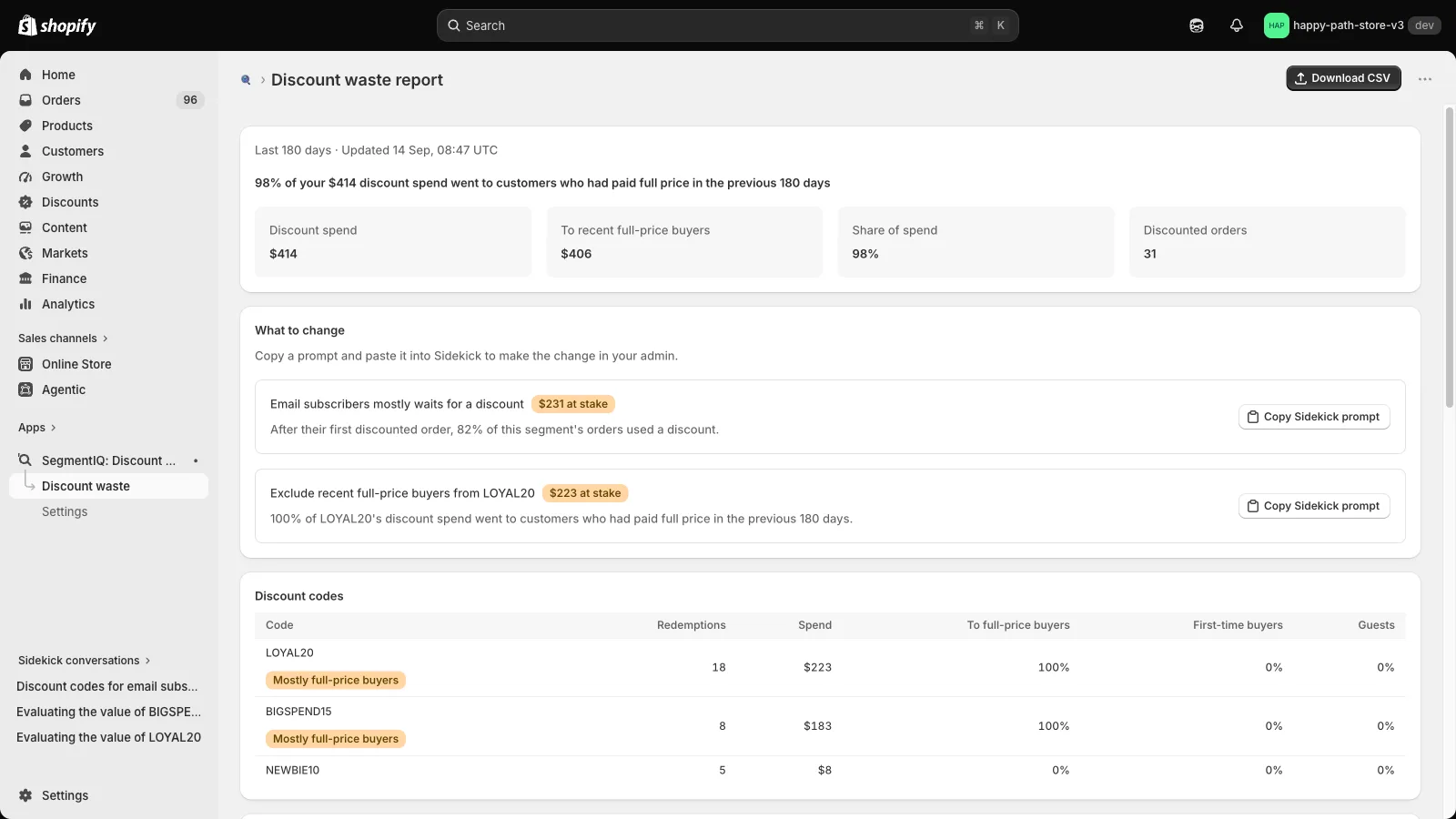
For each discount code, look at how much of its discount went to customers who had paid full price recently, for example in the previous 180 days. They had shown they'd buy without a code, so that's the discount most at risk of being cannibalized.
- Export your orders from Shopify (Orders → Export, CSV) covering at least a year.
- Drop the file into the free Discount Code Checker. For every code it shows the share of the discount that went to recent full-price buyers. Nothing is uploaded.
Worked example. In the checker's sample file for a fictional tea shop, the loyalty code LOYAL20 gave away £1,073, and 72% of that went to customers who had paid full price in the previous 180 days. That's roughly £770 of discount worth questioning. The welcome code, by contrast, went almost entirely to first-time buyers.
"At risk" isn't "wasted". Some of those customers might have bought less, or later, without the code. The share tells you where to test, not how much you lost.
Estimate 2: pull-forward — what happened around the sale?
Compare your orders during a sale with a normal period before it, and keep watching for a few weeks after. In Shopify Analytics, open a new exploration in the ShopifyQL editor and run:
FROM sales
SHOW orders, total_sales
TIMESERIES day
SINCE -180d UNTIL today
Chart it and look at three things:
- The run-up: did orders dip in the days before the sale started?
- The sale: how far above your normal daily orders did it go?
- The hangover: did orders fall below normal for a while afterwards?
If the dip before and the slump after roughly cancel out the spike, the sale mostly moved revenue around, at a discount.
Estimate 3: conditioning — are customers waiting for discounts?
Take the customers whose first discounted order was a while ago, and check what they did next. If most of their later orders also used a discount, that group has learned to wait. Watch the trend too: a falling share of full-price orders over the months is an early warning.
In a spreadsheet of your orders export, sort by customer email and date, and for each customer count their orders after the first discounted one, and how many of those used a code.
The only way to prove it: a holdout test
Everything above is an estimate from who bought. To know what a discount caused, you need a comparison group that didn't get it:
- Pick an audience you'd normally send a code to, such as an email segment.
- Use your email tool's A/B split to send the code to a random half. The other half gets the same email without the code, or no email.
- After two to four weeks, compare revenue per recipient, not just orders, between the two halves. Subtract the discount given.
If the group without the code spent nearly as much, most of that discount was cannibalized. If they spent far less, the code earned its keep.
What to do with what you find
- High recent full-price share on a code: restrict it, for example to customers who haven't ordered in 90 days, or test a smaller offer.
- A big post-sale slump: shorten the sale, raise the threshold (for example a minimum spend), or use a gift with purchase instead of a percentage off.
- A segment that waits for discounts: send it fewer codes and more non-price reasons to buy, and watch whether full-price orders recover.
All of these figures describe who received a discount, not what it caused. Use them to choose what to test.
Related: What Shopify's "Sales by discount codes" report doesn't tell you · Tracking discount codes by new vs returning customers
Find your most cannibalized codes before Black Friday
SegmentIQ shows how much of every code's discount went to customers who had recently paid full price, compares your sales with the weeks before, and suggests what to change. Read-only, with a free plan.
Install SegmentIQ free